CareSync Developer Guide
Acknowledgements
- This project is built upon AddressBook Level-3 project by the SE-EDU initiative.
- Gradle - for build automation and dependency management: https://gradle.org
- Jackson - JSON parser: https://github.com/FasterXML/jackson
- JavaFX - for UI development: https://openjfx.io
- JUnit5 - testing framework: https://github.com/junit-team/junit5
- MarkBind - for website generation: https://markbind.org
- PlantUML - for diagram creation: https://plantuml.com
- GitHub Copilot - for autocompleting code, drafting code snippets and troubleshooting/debugging
Setting up, getting started
Refer to the guide Setting up and getting started.
Design
Architecture
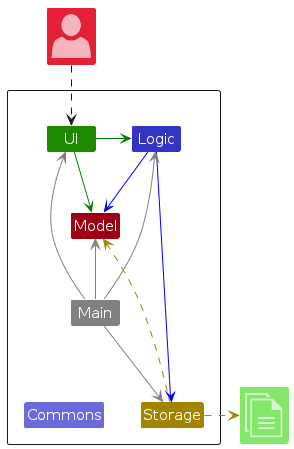
The Architecture Diagram given above explains the high-level design of the App.
Given below is a quick overview of main components and how they interact with each other.
Main components of the architecture
Main (consisting of classes Main and MainApp) is in charge of the app launch and shut down.
- At app launch, it initializes the other components in the correct sequence, and connects them up with each other.
- At shut down, it shuts down the other components and invokes cleanup methods where necessary.
The bulk of the app's work is done by the following four components:
UI: The UI of the App.Logic: The command executor.Model: Holds the data of the App in memory.Storage: Reads data from, and writes data to, the hard disk.
Commons represents a collection of classes used by multiple other components.
How the architecture components interact with each other
The Sequence Diagram below shows how the components interact with each other for the scenario where the user issues the command delete 1.
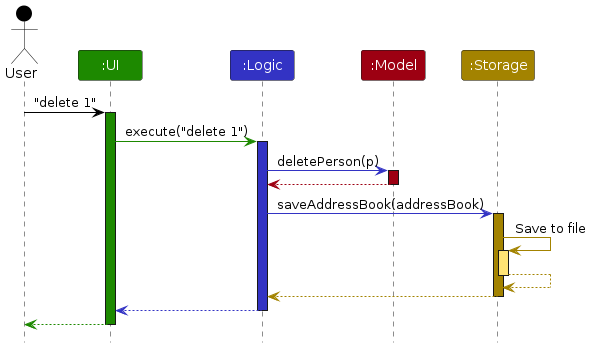
Each of the four main components (also shown in the diagram above),
- defines its API in an
interfacewith the same name as the Component. - implements its functionality using a concrete
{Component Name}Managerclass (which follows the corresponding APIinterfacementioned in the previous point).
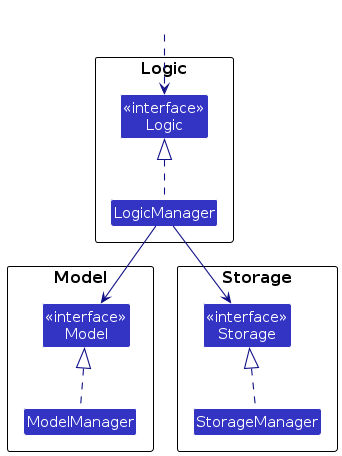
For example, the Logic component defines its API in the Logic.java interface and implements its functionality using the LogicManager.java class which follows the Logic interface. Other components interact with a given component through its interface rather than the concrete class (reason: to prevent outside component's being coupled to the implementation of a component), as illustrated in the (partial) class diagram below.
The sections below give more details of each component.
UI component
The API of this component is specified in Ui.java
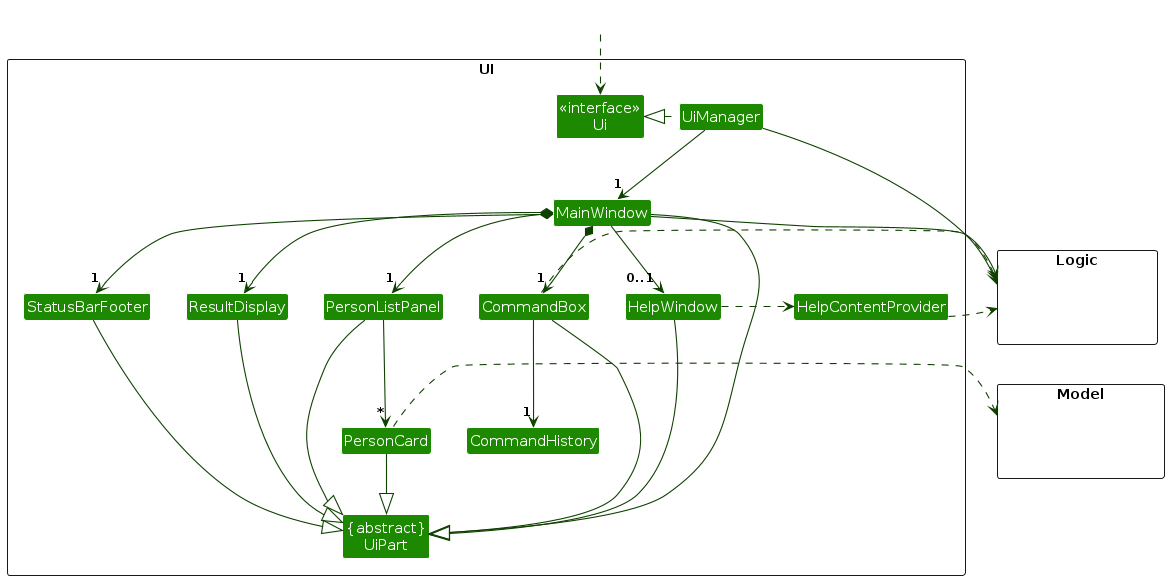
The UI consists of a MainWindow that is made up of parts e.g.CommandBox, ResultDisplay, PersonListPanel, StatusBarFooter etc. All these, including the MainWindow, inherit from the abstract UiPart class which captures the commonalities between classes that represent parts of the visible GUI.
Additionally, there are two helper classes (i.e.CommandHistory and HelpContentProvider) that do not inherit from the abstract UiPart class. They exist to provide their corresponding UI elements with the necessary information to perform their function.
CommandHistorystores past commands that the user has entered, regardless if it was a valid command or not, to be used to fillCommandBoxHelpContentProvidergets the information needed to populateHelpWindow
The UI component uses the JavaFx UI framework. The layout of these UI parts are defined in matching .fxml files that are in the src/main/resources/view folder. For example, the layout of the MainWindow is specified in MainWindow.fxml
The UI component,
- executes user commands using the
Logiccomponent. - listens for changes to
Modeldata so that the UI can be updated with the modified data. - keeps a reference to the
Logiccomponent, because theUIrelies on theLogicto execute commands. - depends on some classes in the
Modelcomponent, as it displaysPersonobject residing in theModel.
Logic component
API : Logic.java
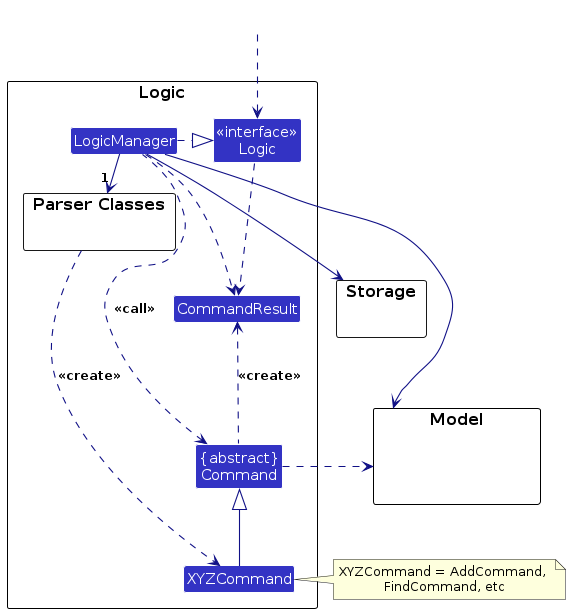
Here's a (partial) class diagram of the Logic component:
The sequence diagram below illustrates the interactions within the Logic component, taking execute("delete 1 3 6-9") API call as an example.
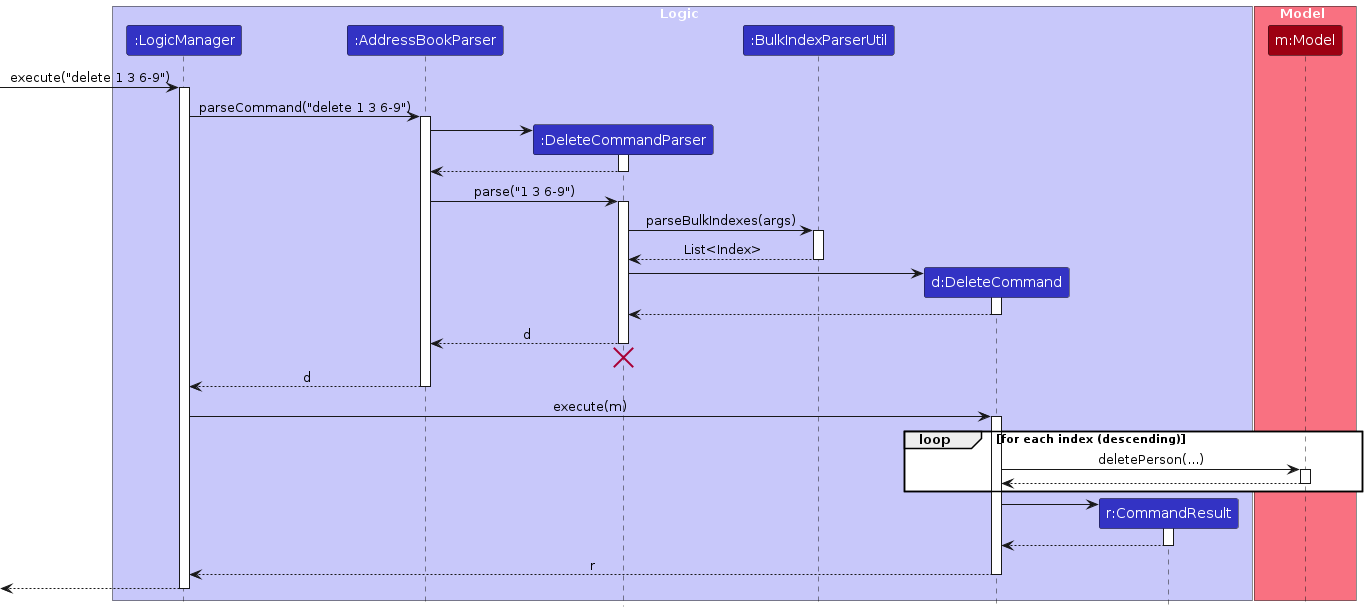
Note: The lifeline for DeleteCommandParser should end at the destroy marker (X) but due to a limitation of PlantUML, the lifeline continues till the end of diagram.
How the Logic component works:
- When
Logicis called upon to execute a command, it is passed to anAddressBookParserobject which in turn creates a parser that matches the command (e.g.,DeleteCommandParser) and uses it to parse the command. - This results in a
Commandobject (more precisely, an object of one of its subclasses e.g.,DeleteCommand) which is executed by theLogicManager. - The command can communicate with the
Modelwhen it is executed (e.g. to delete a person).
Note that although this is shown as a single step in the diagram above (for simplicity), in the code it can take several interactions (between the command object and theModel) to achieve. - The result of the command execution is encapsulated as a
CommandResultobject which is returned back fromLogic.
Here are the other classes in Logic (omitted from the class diagram above) that are used for parsing a user command:
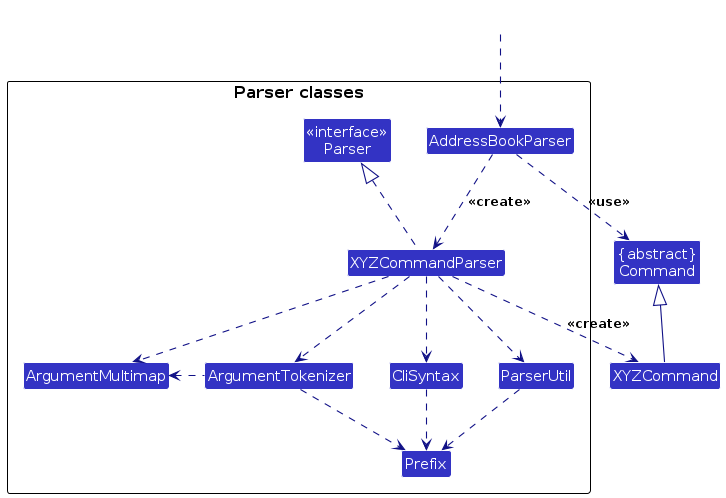
How the parsing works:
- When called upon to parse a user command, the
AddressBookParserclass creates anXYZCommandParser(XYZis a placeholder for the specific command name e.g.,AddCommandParser) which uses the other classes shown above to parse the user command and create aXYZCommandobject (e.g.,AddCommand) which theAddressBookParserreturns back as aCommandobject. - All
XYZCommandParserclasses (e.g.,AddCommandParser,DeleteCommandParser, ...) inherit from theParserinterface so that they can be treated similarly where possible e.g, during testing.
Model component
API : Model.java
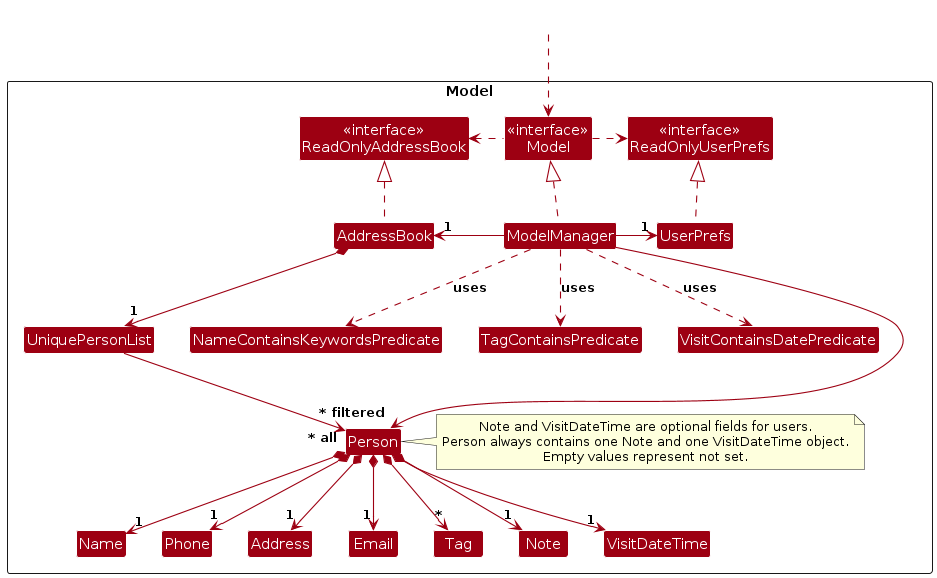
The Model component,
- stores the address book data i.e., all
Personobjects (which are contained in aUniquePersonListobject). EachPersonholds exactly oneName,Phone,Email,Address,Note, andVisitDateTimeobject, along with zero or moreTagobjects. - manages the lifecycle of clients' data, including adding, deleting, and archiving/unarchiving persons.
- stores the currently 'selected'
Personobjects as a separate filtered list which is exposed as an unmodifiableObservableList<Person>to be viewed. The UI can be bound to this list so that UI can automatically update when the data in the list changes. - supports dynamic filtering of the person list via predicates such as
NameContainsKeywordsPredicate,TagContainsPredicate(with partial matching), andVisitContainsDatePredicate. - provides an interface for sorting the filtered list via
sortFilteredPersonList, allowing users to reorder the UI view without changing the original data order. - stores a
UserPrefsobject that represents the user's preferences. This is exposed to the outside as aReadOnlyUserPrefsobject. - exposes the address book data as a
ReadOnlyAddressBookobject to prevent unintended modification from outside theModel. - does not depend on any of the other three components (as the
Modelrepresents data entities of the domain, they should make sense on their own without depending on other components)
Note: Note and VisitDateTime are optional fields from the user's perspective. However, a Person object always contains one Note and one VisitDateTime object, empty values simply represent fields that have not been set by the user. Also, the isArchived flag is a boolean attribute used by the Model to determine a contact's visibility in the default contact list.
Storage component
API : Storage.java
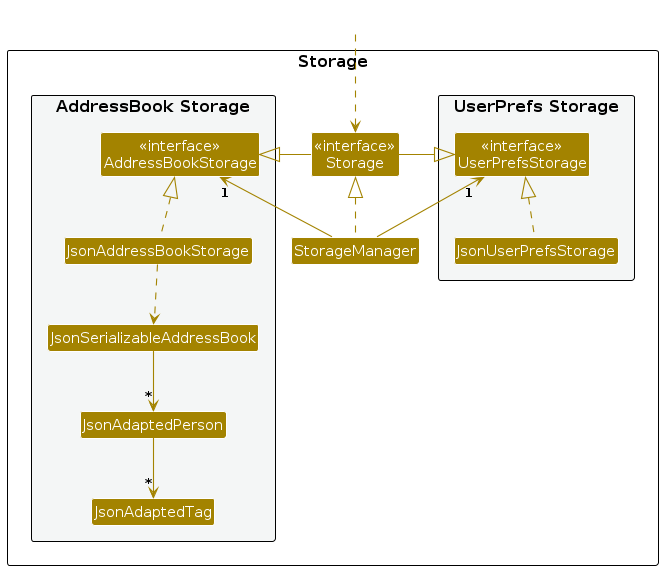
The Storage component,
- can save both address book data and user preference data in JSON format, and read them back into corresponding objects.
- inherits from both
AddressBookStorageandUserPrefStorage, which means it can be treated as either one (if only the functionality of only one is needed). - depends on some classes in the
Modelcomponent (because theStoragecomponent's job is to save/retrieve objects that belong to theModel)
Common classes
The following is a non-exhaustive list of common classes that live in seedu.address.commons and are reused across multiple components:
- Config — stores application configuration such as logging level and file paths.
- GuiSettings — stores UI-related preferences such as window size and position.
- LogsCenter — configures and manages application-wide logging, providing logger instances used across the system.
- JsonUtil and FileUtil — handle data persistence by providing utilities for reading, writing, and serializing data to and from JSON files.
- DataLoadingException and IllegalValueException — represent exceptions related to data loading and validation errors.
- Utility classes such as
AppUtil,CollectionUtil, andStringUtilprovide helper methods for common operations like argument validation, collection handling, and string processing.
Guideline: Components should interact with these classes through their public APIs (interfaces or utility methods) rather than their internal implementation details to maintain loose coupling and improve testability.
Disclaimer: This is a non-exhaustive list of common classes intended to give developers an overview of shared utilities in the application. Refer to the commons package for the complete list of classes.
Implementation
This section describes some noteworthy details on how certain features are implemented.
Archive Feature
Implementation
The archive mechanism is facilitated by an archive flag stored in each contact.
A contact is considered archived when this flag is true, and active otherwise.
The mechanism uses the following Model operations:
archivePerson(person): marks a contact as archived.unarchivePerson(person): marks a contact as active again.updateFilteredPersonList(predicate): refreshes the displayed list for the current command context.
Given below is an example usage scenario and how the archive mechanism behaves at each step.
Step 1. The user executes archive 1.
The archive command validates the index against the current filtered list and archives the selected contact.
Step 2. The command refreshes the filtered list using the current predicate so the UI reflects the updated state.
Step 3. The user executes list-archive.
The displayed list is filtered to show only archived contacts.
Step 4. The user executes unarchive 1 from the archived list.
The unarchive command marks the selected contact as active again and refreshes the list.
Step 5. The command result is returned to Logic, and Logic persists the updated address book through Storage.
The following sequence diagram shows how an archive operation goes through the Logic component:
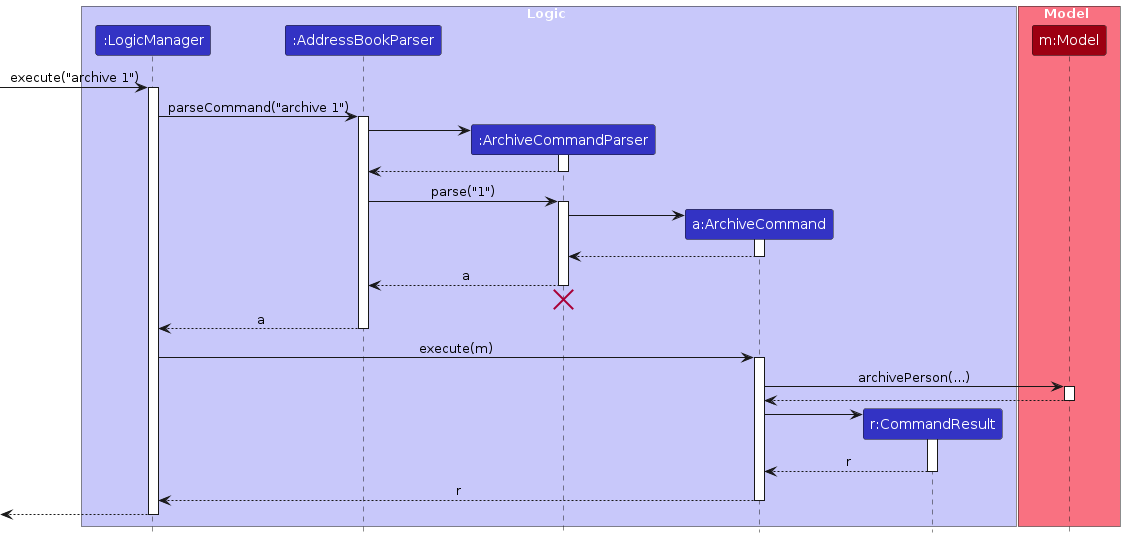
Note: The lifeline for ArchiveCommandParser should end at the destroy marker (X), but due to a limitation of PlantUML, the lifeline continues till the end of the diagram.
Similarly, how an archive operation goes through the Model component is shown below:
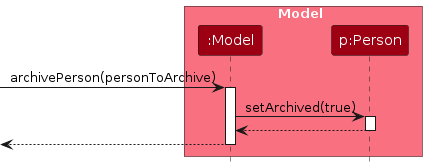
The unarchive command does the opposite. It calls unarchivePerson(person), which restores the selected contact to active state.
Note: If the selected index is invalid, the command returns an error instead of modifying data.
Note: list-archive filtering is applied through updateFilteredPersonList(predicate), not inside archivePerson(...).
The following activity diagram summarizes what happens when a user executes the archive command:
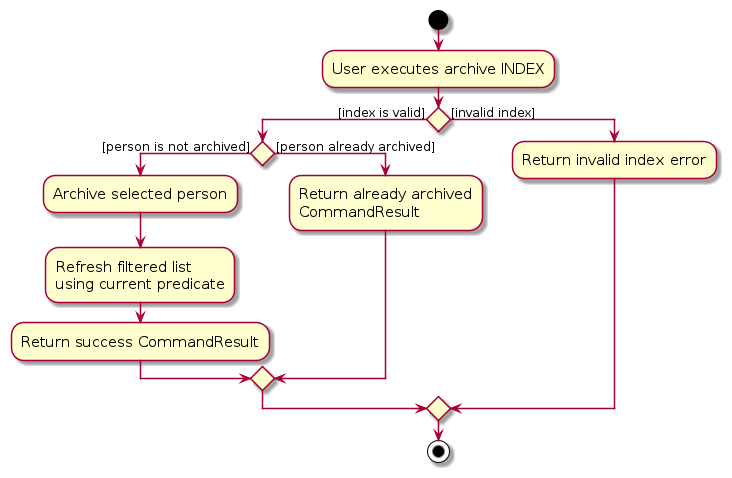
Note: If the command returns an error (for example invalid index), no data is modified.
Note: After successful command execution, Logic persists the current address book through Storage.
Design considerations
Aspect: How archived data is represented
- Alternative 1 (current choice): Keep an archive flag in each Person.
- Pros: Minimal structural changes, straightforward persistence, low implementation overhead.
- Cons: Filtering predicates must be applied consistently across commands.
- Alternative 2: Move archived contacts into a separate collection.
- Pros: Strong conceptual separation between active and archived contacts.
- Cons: Higher complexity for
edit,find,delete, indexing, and synchronization logic.
Documentation, logging, testing, configuration, dev-ops
Appendix: Requirements
Product scope
Target user profile:
- has a need to manage a significant number of client and service contacts
- frequently conducts home visits and requires quick access to visit details
- works under time pressure and must efficiently track last and upcoming visits
- needs to categorise contacts into different roles (e.g., Client, family members, government services)
- requires reminders for follow-ups and scheduled check-ins
- prefers a simple, distraction-free desktop application
- is comfortable using keyboard-driven interfaces and typing commands
- values speed and efficiency over complex graphical interfaces
- wants all visit-related information consolidated in one place
Value proposition: Currently, social workers rely on a combination of paper notebooks, calendars and messaging apps to track who they are visiting, where it takes place and the purpose or outcome of each visit. This fragmentation increases administrative workload, raises the risk of missed follow-ups or incomplete records, and reduces overall efficiency. CareSync helps social service workers keep track of their clients and service contact details as well as allow them to easily track upcoming visits with the various families.
User stories
Priorities: High (must have) - * * *, Medium (nice to have) - * *, Low (unlikely to have) - *
Legend: ✓ = fully implemented; ✗ = not implemented or partially implemented
| Priority | As a … | I want to … | So that I can… | Implemented |
|---|---|---|---|---|
* * * | user | add a contact with basic details | quickly identify who is being visited | ✓ |
* * * | user | delete a contact | remove contacts that are no longer needed | ✓ |
* * * | user | store an address with each contact | know where to go for home visits | ✓ |
* * * | user | set a visit date | know when to go for home visits | ✓ |
* * * | user | see visit date and time clearly | manage daily schedule effectively | ✓ |
* * * | user | add tags to differentiate clients and services | retrieve relevant contact details quickly | ✓ |
* * * | user | add tags to differentiate case ID / client groups | retrieve relevant contact details quickly | ✓ |
* * * | user | filter contacts based on tags | quickly view related contacts based on tag | ✓ |
* * * | user | search for a name | reference contacts clearly | ✓ |
* * | user | see upcoming visits alongside past ones | plan follow-ups effectively | ✗ |
* * | user | have a clean and simple layout | find information quickly between visits | ✓ |
* * | user | sort contacts by name or visit date | find contacts easily | ✓ |
* * | user | mark a contact’s status (e.g. stable, urgent) | prioritise my work | ✗ |
* * | user | add a visit note to a contact | remember the purpose of the visit | ✓ |
* * | user | pin contacts | identify important contacts easily | ✗ |
* * | user | reuse past commands | execute commands faster | ✓ |
* * | user | autocomplete commands | execute commands faster | ✓ |
* * | user | undo commands | undo any wrong changes | ✗ |
* * | user | archive contacts | hide irrelevant contacts without deleting them | ✓ |
* * | user | list archived contacts | view hidden contacts | ✓ |
* * | user | unarchive contacts | restore hidden contacts to the main contact list | ✓ |
* * | expert user | add aliases to commands | execute commands faster | ✗ |
* * | new user | view a list of common commands when opening the app | refer to instructions without using an external manual | ✓ |
* | expert user | combine commands | execute commands efficiently | ✗ |
* | user | set visit type (e.g. consultation, remote) | understand the nature of the vist | ✗ |
* | user | specify the visit duration | plan my time realistically | ✗ |
* | user | view completed visits | understand my visit history | ✗ |
* | user | mark a visit as planned, completed, or cancelled | track visit status and outcomes | ✗ |
* | user | be sure that visit records remain unchanged | be held accountable for the visit | ✗ |
* | returning user | import contact details from an existing CareSync JSON file | continue using CareSync seamlessly | ✓ |
{More may be added in the future}
Use cases
(For all use cases below, the System is the CareSync and the Actor is the user, unless specified otherwise)
Use case: UC1 - Add Contact
Guarantee:
- If successful, the contact will be stored and visible in the contact list.
- A duplicate contact (same name) will never be added.
- Malformed contacts based on invalid command entry will never be added.
MSS
User enters the required details (
Name,Phone,Email,Address) to add a contact. Optional fields likeNoteandVisitDateTimecan also be included.CareSync validates the entered data.
CareSync stores the new contact.
CareSync displays a success message.
Use case ends.
Extensions
2a. CareSync detects invalid input format (e.g., invalid email or incorrectly formatted visit date).
2a1. CareSync displays an error message.
2a2. User re-enters data.
Steps 2a1–2a2 are repeated until the data entered is valid.
Use case resumes from step 3.
2b. CareSync detects existing contact with the same name.
2b1. CareSync notifies the user that the contact already exists.
2b2. User re-enters data.
Steps 2b1–2b2 are repeated until the data entered is valid.
Use case resumes from step 3.
Use case: UC2 - Update Contact
Precondition: A contact exists in CareSync.
Guarantee: If successful, the selected contact’s details will be updated and saved.
MSS
CareSync displays contact(s).
User specifies the ID of the contact and fields to be updated (e.g., note, phone number, email).
CareSync validates the new data.
CareSync updates the contact information.
CareSync displays a success message.
Use case ends.
Extensions
3a. No matching contact is found.
3a1. CareSync informs the user that no match exists.
Use case ends.
3b. CareSync detects invalid input format.
3b1. CareSync displays an error message.
3b2. User re-enters data.
Steps 3b1–3b2 are repeated until the data entered is valid.
Use case resumes from step 4.
Use case: UC3 - Delete Contact(s)
Precondition: One or more contacts exist in CareSync.
Guarantee: If successful, the specified contact(s) will be permanently removed from CareSync. if any index is invalid, no contacts are deleted.
MSS
CareSync displays contact(s).
User specifies the ID(s) or Range of ID(s) of the contacts to be deleted (e.g.,
1 3-5).CareSync validates all specified contact indexes.
CareSync removes the contact(s) from storage.
CareSync displays a success message and an updated list.
Use case ends.
Extensions
3a. User entered an invalid ID or an invalid range (e.g.,
3-1).3a1. CareSync displays an error message.
3a2. No contacts are deleted.
3a3. User re-enters data.
Steps 3a1–3a3 are repeated until the data entered is valid.
Use case resumes from step 4.
Use case: UC4 - Search Contact
Guarantee: Matching contact(s) are displayed to the user, if any. CareSync enforces a strict Single-Mode policy.
MSS
User specifies exactly one search criterion (by name, tag, or visit date).
CareSync validates that no preamble exists and only one input search mode.
CareSync retrieves and displays matching contact(s).
Use case ends.
Extensions
2a. User provides multiple search modes or text before the prefix.
2a1. CareSync displays the appropriate error message.
Use case ends.
3a. No matching contact is found.
3a1. CareSync displays a message indicating no results.
Use case ends.
Use case: UC5 - Manage Notes
MSS
User specifies the ID of the contact and provides a note.
CareSync updates (change or delete) the contact's note.
CareSync displays a success message.
Use case ends.
Use case: UC6 - Manage Tags
MSS
User specifies the ID of the contact and tags to add or delete.
CareSync verifies that the tags to be added do not exist and tags to be deleted exist.
CareSync updates the contact's tag set.
Use case ends.
Extensions
2a. No matching contact is found (e.g., invalid ID specified by the user).
- 2a1. CareSync displays a message indicating no result.
- Use case ends.
2b. Validation fails (e.g., deleting a tag the contact does not have).
- 2b1. CareSync displays an error message. No changes are applied.
- Use case ends.
Use case: UC7 - Archive / Unarchive Contact
MSS
User specifies the ID of the contact to
archive(orunarchive).CareSync validates if the contact exists.
CareSync checks the current status of the contact (e.g., if the contact is already archived).
CareSync updates the contact's status.
CareSync refreshes the displayed list.
Use case ends.
Extensions
2a. The contact does not exist.
2a1. CareSync displays an error message.
Use case ends.
3a. The contact is already in the target state.
3a1. CareSync displays a message indicating the contact is already archived (or unarchived).
Use case ends.
Use case: UC8 - Sort Contact List
MSS
User requests to list contacts with a sort field (e.g., name).
CareSync validates the specified field.
CareSync sorts the contact list according to the field.
CareSync displays the sorted list. (Sorting will remain persistent until a new sort field is requested).
Use case ends.
Extensions
2a. The specified field is invalid.
2a1. CareSync displays an error message.
Use case ends.
Use case: UC9 - View Archived Contacts
MSS
User requests to see the archive list.
CareSync filters and displays only archived contacts.
Use case ends.
Use case: UC10 - Clear All Entries
MSS
User requests to clear all data.
CareSync removes all contacts from the address book.
CareSync displays an empty list.
Use case ends.
Use case: UC11 - Command Autocompletion
MSS
User types the beginning of a command or prefix.
CareSync suggests a completion for the command or prefix.
User accepts the suggestion.
CareSync completes the command or prefix in the command box.
Use case ends.
Extensions
2a. There is no valid completion for the current input.
2a1. CareSync provides no suggestion.
Use case ends.
Use case: UC12 - View Help Information
MSS
User requests help (e.g., types help or clicks the help menu).
CareSync opens the help window containing the link to the User Guide.
CareSync focuses the help window.
Use case ends.
Extensions
2a. The help window is already open but hidden behind the main window.
- 2a1. CareSync brings it to the front of the screen.
Use case resumes at step 3.
Use case: UC13 - Access Command History
MSS
User is in the command input box.
User navigates to view past commands.
CareSync retrieves and displays the previous or next command from the session history.
Use case ends.
Extensions
2a. There is no previous/next command in the history (e.g., user is at the start of the session).
- 2a1. CareSync maintains the current text in the input box.
- Use case ends.
2b. The user has entered consecutive identical commands (e.g.,
list, thenlist).- 2b1. CareSync collapses these into a single history entry.
- Use case resumes at step 3.
Non-Functional Requirements
- Should work on any mainstream OS as long as it has Java 17 or above installed.
- A user with above average typing speed for regular English text (i.e. not code, not system admin commands) should be able to accomplish most of the tasks faster using commands than using the mouse.
- The system should respond to user commands within 2 seconds under normal usage.
- The system should support at least 20 contacts without noticeable performance degradation.
- Filtering and search operations should complete within 2 seconds.
- The system should be able to load stored data within 3 seconds upon startup.
- The application should not crash upon receiving malformed data.
- Error messages shall be clear and actionable (e.g., specify which field is invalid).
- Command syntax shall be consistent and predictable across features.
- The system shall automatically persist data after every valid modification.
- Completed visits shall not be modified without explicit action.
- Contact names shall not be empty.
- Phone numbers shall follow a defined format.
- Dates and times shall follow a consistent format.
- The system architecture should allow future expansion of features (e.g., additional commands or data fields) without requiring major restructuring of existing components.
{More may be added in the future}
Glossary
- Mainstream OS: Windows, Linux, Unix, MacOS.
- Tag: A label that can be assigned to a contact to categorise them.
- ID: The currently displayed list number of the specific contact.
- Case ID: A Case ID is a unique identifier assigned to a specific client case or record within CareSync. It allows users to track and reference a particular case efficiently, ensuring that all family members that are associated with the clients are displayed.
- Command: An instruction entered by the user to execute a specific action.
Appendix: Instructions for manual testing
Given below are instructions to test the app manually.
Note: These instructions only provide a starting point for testers to work on; testers are expected to do more exploratory testing.
Manual testing conventions
- Detailed command syntax, parameter constraints, and usage examples are documented in the User Guide under each command section
- DG manual tests focus on behavior verification (state change, list update, and error handling), not re-explaining command format
- For commands using
INDEX, runlistfirst (orlist-archiveforunarchive) unless the test case explicitly requires a filtered list - Where a negative test lists a message, verify the exact message shown in the result box
Launch and shutdown
Initial launch
Steps:
- Download the latest jar file and copy into an empty folder.
- Double-click the jar file.
Expected:
- Shows the GUI with a set of sample contacts. The window size may not be optimum.
Saving window preferences
Steps:
- Resize the window to an optimum size.
- Move the window to a different location.
- Close the window.
- Re-launch the app by double-clicking the jar file.
Expected:
- The most recent window size and location is retained.
Viewing help : help
Prerequisites:
- CareSync is running.
- Refer to User Guide: Viewing help for command usage
Positive Test Case 1: Run the help command
Steps:
- Run
help
Expected:
- Help window opens.
Positive Test Case 2: Run the help command with existing help window
Steps:
- Run
help - Minimise the help window.
- Run
helpagain.
Expected:
- Existing help window is focused.
Positive Test Case 3: Run help with extra parameters
Steps:
- Run
help 123
Expected:
- Help window opens.
Adding a contact: add
Prerequisites:
- CareSync is running.
- Run
listto see the current contact list. - Refer to User Guide: Adding a contact for full field rules
Positive Test Case 1: Add with compulsory fields only
Steps:
- Run
add n/Hugo p/96543218 e/hugo@example.com a/Hugo street, block 123, #01-01
Expected:
- Message:
New contact added: ... - Contact is added to the list with the specified values.
Positive Test Case 2: Add with all fields
Steps:
- Run
add n/John Doe p/+65 9876-5432 e/johnd@example.com a/John street, block 123, #01-01 nt/Needs financial support v/2026-12-01 14:00 t/caseid6
Expected:
- Message:
New contact added: ... - Contact is added with optional fields populated.
Positive Test Case 3: Add contacts with duplicate non-name fields
Steps:
- Run
add n/Alice One p/88883333 e/alice@example.com a/Alice street, block 123, #01-01 - Run
add n/Alice Two p/88883333 e/alice@example.com a/Alice street, block 123, #01-01
Expected:
- Both commands succeed.
- Both contacts are present in the list.
Positive Test Case 4: Duplicate tag values
Steps:
- Run
add n/Bob p/91234567 e/bob@example.com a/Bob street, block 123, #01-01 t/friend t/Friend
Expected:
- Command succeeds but only one
friendtag is added.
Negative Test Case 1: Add duplicate contact
Steps:
- Run
add n/Alicia p/80015678 e/alicia@example.com a/Alicia street, block 123, #01-01 - Run the same command again.
Expected:
- Second command fails with message:
This contact already exists in the address book - No duplicate contact is added.
Negative Test Case 2: Invalid name
Steps:
- Run
add n/Bob- p/92225430 e/bob@example.com a/Bob street, block 123, #01-01
Expected:
- Command fails with message:
Names should only contain alphanumeric characters...
Negative Test Case 3: Invalid phone
Steps:
- Run
add n/Bob p/+-- e/bob@example.com a/Bob street, block 123, #01-01
Expected:
- Command fails with message:
Phone numbers should be at most 15 characters...
Negative Test Case 4: Invalid email
Steps:
- Run
add n/Bob p/91234567 e/bemail a/Bob street, block 123, #01-01
Expected:
- Command fails with message:
Emails should be of the format local-part@domain...
Negative Test Case 5: Invalid address
Steps:
- Run
add n/Bob p/91234567 e/bob@example.com a/Bob street/block123
Expected:
- Command fails with message:
Addresses should not be blank, must be at most 120 characters...
Negative Test Case 6: Invalid note
Steps:
- Run
add n/Bob p/91234567 e/bob@example.com a/Bob street, block 123, #01-01 nt/notes+-
Expected:
- Command fails with message:
Notes should be up to 150 characters and contain only alphanumeric...
Negative Test Case 7: Invalid visit date
Steps:
- Run
add n/Bob p/91234567 e/bob@example.com a/Bob street, block 123, #01-01 v/2026-12-32 12:00
Expected:
- Command fails with message:
Visit date and time must be a valid date and time in the format: yyyy-MM-dd HH:mm...
Negative Test Case 8: Invalid visit time
Steps:
- Run
add n/Bob p/91234567 e/bob@example.com a/Bob street, block 123, #01-01 v/2026-12-01 25:00
Expected:
- Command fails with message:
Visit date and time must be a valid date and time in the format: yyyy-MM-dd HH:mm...
Negative Test Case 9: Invalid tag
Steps:
- Run
add n/Bob p/91234567 e/bob@example.com a/Bob street, block 123, #01-01 t/fr!end
Expected:
- Command fails with message:
Tag names should be alphanumeric and at most 15 characters long
Archiving a contact : archive
Prerequisites:
- At least one visible contact exists in the current list.
- Run
listbefore each INDEX-based test unless the test case intentionally uses a filtered list. - There are fewer than 999 contacts.
- Refer to User Guide: Archiving a contact for command usage
Positive Test Case 1: Archive by valid index
Steps:
- Run
archive 1
Expected:
- Command succeeds with
Archived: ...message.
Positive Test Case 2: Archive from filtered result
Steps:
- Run
find n/Alex - Run
archive 1
Expected:
- The first displayed contact in filtered results is archived.
Negative Test Case 1: Invalid index format
Steps:
- Run
archive a
Expected:
- Command fails with message:
Invalid command format! archive: Archives the contact...
Negative Test Case 2: Out-of-range index
Steps:
- Run
archive 999
Expected:
- Command fails with message:
The contact index provided is invalid
Listing all unarchived contacts : list
Prerequisites:
- CareSync is running.
- Refer to User Guide: Listing all unarchived contacts for sorting behavior details
Positive Test Case 1: List without sorting
Steps:
- Run
list
Expected:
- All contacts are displayed.
Positive Test Case 2: List sorted by name
Steps:
- Run
list s/name
Expected:
- All contacts are displayed sorted by name.
Positive Test Case 3: List sorted by visit
Steps:
- Run
list s/visit
Expected:
- All contacts are displayed sorted by visit date/time.
Negative Test Case 1: Invalid sort field
Steps:
- Run
list s/phone
Expected:
- Command fails with message:
Invalid sort field. Valid options are: name, visit
Negative Test Case 2: Unexpected preamble token
Steps:
- Run
list abc
Expected:
- Command fails with message:
Invalid command format! list: Lists all contacts...
Listing all archived contacts : list-archive
Prerequisites:
- At least one archived contact exists (optional, for non-empty results).
- Refer to User Guide: Listing all archived contacts for command usage
Positive Test Case 1: List archived contacts
Steps:
- Run
list-archive
Expected:
- Only archived contacts are shown.
Positive Test Case 2: Run with extra text
Steps:
- Run
list-archive 123
Expected:
- Command still works and shows archived contacts.
Editing a contact : edit
Prerequisites:
- At least one contact exists in current displayed list.
- Run
listbefore each INDEX-based test case. - There are fewer than 999 contacts.
- Refer to User Guide: Editing a contact for field behavior (including tag replacement via
t/)
Positive Test Case 1: Edit one field
Steps:
- Run
edit 1 p/91234567
Expected:
- Command succeeds and phone for contact 1 is updated.
Positive Test Case 2: Edit multiple fields
Steps:
- Run
edit 1 e/newmail@example.com a/12-34, Sample Road #01-01
Expected:
- Command succeeds and both fields are updated.
Positive Test Case 3: Clear tags using t/
Steps:
- Run
edit 1 t/
Expected:
- Command succeeds and tags for contact 1 are cleared.
Positive Test Case 4: Clear note using nt/
Steps:
- Run
edit 1 nt/
Expected:
- Command succeeds and note for contact 1 is cleared.
Positive Test Case 5: Clear visit date and time using v/
Steps:
- Run
edit 1 v/
Expected:
- Command succeeds and visit date and time for contact 1 are cleared.
Positive Test Case 6: Duplicate tag values
Steps:
- Run
edit 1 t/friend t/Friend
Expected:
- Command succeeds but only one
friendtag is added.
Negative Test Case 1: No fields supplied
Steps:
- Run
edit 1
Expected:
- Command fails with message:
At least one field to edit must be provided.
Negative Test Case 2: Invalid index
Steps:
- Run
edit 999 p/91234567
Expected:
- Command fails with message:
The contact index provided is invalid
Negative Test Case 3: Invalid phone
Steps:
- Run
edit 1 p/911a
Expected:
- Command fails with message:
Phone numbers should be at most 15 characters...
Negative Test Case 4: Invalid address
Steps:
- Run
edit 1 a/Bob street/block123
Expected:
- Command fails with message:
Addresses should not be blank, must be at most 120 characters...
Locating contacts by specified field: find
Prerequisites:
- CareSync is running.
- Refer to User Guide: Locating contacts by specified field for single-mode and prefix rules
Positive Test Case 1: Find by name keywords
Steps:
- Run
find n/Alex David
Expected:
- Contacts with any part of their name starting with
AlexorDavid(case-insensitive) are shown.
Positive Test Case 2: Find by tag
Steps:
- Run
find t/friends
Expected:
- Contacts with tag(s) starting with
friends(case-insensitive) are shown.
Positive Test Case 3: Find by specific date
Steps:
- Run
find d/2026-12-01
Expected:
- Contacts with visit date on 2026-12-01 are shown.
Positive Test Case 4: Find by today keyword
Steps:
- Run
find d/today
Expected:
- Contacts with visit date on today are shown.
Positive Test Case 5: Find by date range
Steps:
- Run
find sd/2026-01-01 ed/2026-12-31
Expected:
- Contacts with visit dates in range are shown.
Negative Test Case 1: Mixed modes in one command
Steps:
- Run
find n/Alex t/friends
Expected:
- Command fails with message:
Only one search type allowed.
Negative Test Case 2: Missing date range pair
Steps:
- Run
find sd/2026-01-01
Expected:
- Command fails with message:
Both sd/ and ed/ must be provided together.
Negative Test Case 3: Invalid date range order
Steps:
- Run
find sd/2026-12-31 ed/2026-01-01
Expected:
- Command fails with message:
Start date cannot be after end date!
Adding note to a contact : note
Prerequisites:
- At least one contact exists in current displayed list.
- Run
listbefore each INDEX-based test case. - Refer to User Guide: Adding note to a contact for note semantics
Positive Test Case 1: Add/replace note
Steps:
- Run
note 1 nt/Requires wheelchair assistance
Expected:
- Command succeeds and note is updated for contact 1.
Positive Test Case 2: Clear note
Steps:
- Run
note 1 nt/
Expected:
- Command succeeds and note is cleared for contact 1.
Negative Test Case 1: Missing note prefix
Steps:
- Run
note 1
Expected:
- Command fails with message:
Invalid command format! note: Edits the note of the contact...
Negative Test Case 2: Invalid index
Steps:
- Run
note -1 nt/Follow up
Expected:
- Command fails with message:
Invalid index. Index must be a non-zero positive integer (1, 2, 3...).
Managing tags for a contact : tag
Prerequisites:
- At least one contact exists.
- Run
listbefore each INDEX-based test case. - Refer to User Guide: Managing tags for a contact for
at/anddt/behavior
Positive Test Case 1: Add one tag
Steps:
- Run
tag 1 at/client
Expected:
- Command succeeds and
clienttag is added.
Positive Test Case 2: Delete one tag
Steps:
- Ensure contact 1 has
clienttag. - Run
tag 1 dt/client
Expected:
- Command succeeds and
clienttag is removed.
Positive Test Case 3: Add and delete in one command
Steps:
- Ensure contact 1 has
friendtag. - Run
tag 1 at/family dt/friend
Expected:
- Command succeeds and both tag updates are applied.
Positive Test Case 4: Adding duplicate tag values
Steps:
- Run
tag 1 at/friend at/Friend
Expected:
- Command succeeds but only one
friendtag is added.
Negative Test Case 1: No at/ and dt/ provided
Steps:
- Run
tag 1
Expected:
- Command fails with message:
Tag to add or delete must be provided.
Negative Test Case 2: Add existing tag
Steps:
- Ensure contact 1 already has
friends - Run
tag 1 at/friends
Expected:
- Command fails with message:
The tag [friends] already exists for this person.
Negative Test Case 3: Delete non-existent tag
Steps:
- Run
tag 1 dt/notpresent
Expected:
- Command fails with message:
The tag [notpresent] does not exist, cannot be deleted.
Deleting contact(s) : delete
Prerequisites:
- At least 5 contacts exist.
- Run
listbefore each INDEX-based test case. - There are fewer than 999 contacts.
- Refer to User Guide: Deleting contacts for index/range syntax rules
Positive Test Case 1: Delete single index
Steps:
- Run
delete 2
Expected:
- Contact at index 2 is removed.
Positive Test Case 2: Delete multiple indexes and range
Steps:
- Run
delete 1 3-4 5
Expected:
- All specified contacts are deleted in one command.
Positive Test Case 3: Duplicate indexes are ignored
Steps:
- Run
delete 2 2 2-2
Expected:
- Contact 2 is deleted once without errors.
Negative Test Case 1: Descending range
Steps:
- Run
delete 5-2
Expected:
- Command fails with message:
Invalid range. Start index must be less than or equal to end index.
Negative Test Case 2: Out-of-range index in bulk delete
Steps:
- Run
delete 1 999
Expected:
- Command fails with message:
Invalid indices: 999. Contact does not exist in current list.
Negative Test Case 3: Invalid token
Steps:
- Run
delete a
Expected:
- Command fails with message:
Invalid input. Only positive integers and ranges like 1 or 3-5 are allowed.
Negative Test Case 4: Range too large
Steps:
- Run
delete 1-150
Expected:
- Command fails with message:
Range too large. A range can include at most 100 indices...
Negative Test Case 5: Index specified in range is too large
Steps:
- Run
delete 19999999999-20000000000
Expected:
- Command fails with message:
Index specified for range is too large. Please specify a smaller index.
Negative Test Case 6: Invalid index
Steps:
- Run
delete -1
Expected:
- Command fails with message:
Invalid index. Index must be a non-zero positive integer (1, 2, 3...).
Negative Test Case 7: Index too large
Steps:
- Run
delete 10000000000
Expected:
- Command fails with message:
Index too large. Please specify a valid index.
Unarchiving a contact : unarchive
Prerequisites:
- At least one archived contact exists for positive flow.
- Run
list-archivebefore each INDEX-based test case. - There are fewer than 999 archived contacts.
- Refer to User Guide: Unarchiving a contact for command usage
Positive Test Case 1: Unarchive from archived list
Steps:
- Run
unarchive 1
Expected:
- Command succeeds with
Unarchived: ...message.
Negative Test Case 1: Invalid index format
Steps:
- Run
unarchive abc
Expected:
- Command fails with message:
Invalid command format! unarchive: Unarchives the contact...
Negative Test Case 2: Out-of-range index
Steps:
- Run
unarchive 999
Expected:
- Command fails with message:
The contact index provided is invalid
Clearing all entries : clear
Prerequisites:
- At least one contact exists.
- Refer to User Guide: Clearing all entries for command usage
Positive Test Case 1: Clear all contacts
Steps:
- Run
clear
Expected:
- Command succeeds with message:
Address book has been cleared! - Contact list becomes empty.
Positive Test Case 2: Clear with extra text
Steps:
- Run
clear now
Expected:
- Command still clears all entries (extra text is ignored).
Exiting the program : exit
Prerequisites:
- CareSync is running.
- Refer to User Guide: Exiting the program for command usage
Positive Test Case 1: Exit command
Steps:
- Run
exit
Expected:
- CareSync closes.
Positive Test Case 2: Exit with extra text
Steps:
- Run
exit please
Expected:
- CareSync closes (extra text is ignored).
Autocompleting a command
Prerequisites:
- CareSync command box is focused.
- Refer to User Guide: Autocompleting a command for autocomplete rules
Positive Test Case 1: Autocomplete command word
Steps:
- Type
d - Press
TAB
Expected:
- Input autocompletes to
delete
Positive Test Case 2: Autocomplete prefixes
Steps:
- Type
add - Press
TABto insert the first prefix. - Type a value for that parameter and add a trailing space.
- Press
TABagain to get the next prefix.
Expected:
- Prefix suggestions are inserted in order, starting with
n/
Positive Test Case 3: Autocomplete with index-required command
Steps:
- Type
editand pressTAB - Type
edit 1and pressTAB
Expected:
- Step 1: no prefix suggestion is accepted.
- Step 2: prefix suggestion is accepted (starts with
n/).
Positive Test Case 4: Autocomplete stops when command becomes invalid
Steps:
- Type
find n/Alexand pressTAB - Type
edit 1 n/Joe x/aand pressTAB
Expected:
- Step 1: no additional prefix suggestion is accepted for
find - Step 2: no additional prefix suggestion is accepted because the command input is invalid.
Remembering a command
Prerequisites:
- CareSync command box is focused.
- Refer to User Guide: Remembering a command for history behavior
Positive Test Case 1: Recall older commands
Steps:
- Run
list - Run
find n/Alex - Press
ARROW_UPtwice.
Expected:
- First
ARROW_UP: command box showsfind n/Alex - Second
ARROW_UP: command box showslist
Positive Test Case 2: Navigate back down
Steps:
- After recalling older commands, press
ARROW_DOWNuntil newest.
Expected:
- Command box cycles toward newer commands and finally becomes empty.
Positive Test Case 3: Consecutive duplicates are not duplicated in history
Steps:
- Run
list - Run
listagain. - Press
ARROW_UPonce.
Expected:
- Only one
listentry is recalled for consecutive duplicate submissions.
Saving data
Refer to User Guide: Saving the data and User Guide: Editing the data file for storage behavior details.
Positive Test Case 1: Missing data file
Steps:
- Navigate to the
datafolder. - Delete
addressbook.jsonif it exists. - Launch CareSync with
java -jar CareSync.jar
Expected:
- CareSync creates a new
addressbook.jsonfile with the default sample data.
Positive Test Case 2: Corrupted data file
Steps:
- Navigate to the
datafolder. - Open
addressbook.json - Modify the file such that the data file is now invalid.
- Save the file.
- Launch CareSync with
java -jar CareSync.jar
Expected:
- CareSync discards all data and starts with an empty data file.
Positive Test Case 3: Data saved after commands
Steps:
- Launch CareSync with
java -jar CareSync.jar - Add, edit or delete a contact using the
add,edit,deletecommands respectively. - Close CareSync.
Expected:
- Changes are saved correctly in
addressbook.json
Appendix: Planned Enhancement
Team Size: 5
- Adjust name validation constraints: The current regex rejects legitimate names (e.g., names contain hyphens), preventing record accurate details for clients with diverse names. We will update the validation logic based on actual needs to accept a wider range of naming conventions.
- Fix sorting list feature flaws: Currently, since the application allows users to add past dates for next visits, sorting by date will place past dates at the top, forcing users to scroll past irrelevant data. We plan to add a separate section specifically for displaying past visit dates, ensuring the list sorted by next visit date displays effectively.
- Add confirmation prompts for destructive actions: Currently, the application executes the
clearanddeletecommands immediately without any warning, increasing the risk of accidental data loss. We plan to require a mandatory--forceflag for clearing data or deleting more than 5 contacts at once. If a user attempts these actions without the flag, the system will reject and display a warning (e.g., "Warning: This action cannot be undone, use--forceto confirm."). - Enforce exact matching for Case ID search: Currently, the tag search function uses partial prefix matching, which means that searching for a specific case (e.g.,
caseid1) will incorrectly return irrelevant cases, such ascaseid10andcaseid11. This contradicts the system's definition of case IDs as unique identifiers. We plan to implement strict exact matching specifically for case ID tag to retrieve the exact target cases. - Enhance email validation: Currently, the application accepts invalid email formats (e.g., missing domains), leading to unusable data for contacts. We plan to enforce stricter validation, requiring complete domain names to ensure all stored email addresses are accurate and valid.
- Allow contacts with identical names but different details: Currently, the application does not allow multiple contacts with the same name even if their other details differ. To better reflect real-world cases where people can have identical names, we plan to allow multiple contacts with the same name as long as other identifying fields (e.g., phone number, address) are different.
- Improve response command box usability: Currently, the response text box requires horizontal scrolling to view long messages and is too small, making it difficult for users to read outputs without excessive scrolling. We plan to modify the UI so that the text box wraps text and supports vertical scrolling, as well as increase its size to display more content at once for better readability.
- Enable sorting in archived contact list: Currently, users are unable to sort contacts in the archived list. We plan to add sorting functionality (e.g. by name and visit date) to the archived contacts list to improve usability and navigation. For example, users can enter
list-archive s/nameto view archived contacts sorted by name orlist-archive s/visitto view archived contacts sorted by visit date. - Allow text selection in help window: Currently, users are unable to select or copy text from the help window. We plan to enable text selection so that users can copy commands or instructions easily for reference.
- Support bulk archive and unarchive of contacts: Currently, users can only archive or unarchive contacts individually. We plan to allow users to perform bulk archive and unarchive actions on multiple contacts in a single command to improve efficiency. For example, users can enter
archive 1 3-5 8to archive multiple contacts at once orunarchive 1 4 6to unarchive multiple contacts at once.
Appendix: Effort
This appendix summarises the overall effort put in by the team for CareSync. Using AB3 as a reference point, it also details the difficulty level, challenges faced, achievements and reuse of the project.
Difficulty Level
AB3 manages a single entity with basic features such as:
- Adding a person
- Editing a person
- Deleting a person
- Finding a person by name
- Listing all persons
CareSync builds upon these existing features and introduces even more complex features aimed to provide real value to our target users:
- Adding notes to contacts
- Storing clients' visit date and time
- Finding contacts by tag or visit date
- Sorting the contact list by name or visit date-time
- Bulk delete operation
- Archiving contacts
- Autocomplete commands
- Cycle through past commands for reuse
Additionally, CareSync introduces constraints of higher complexity in order to reduce bugs and ensure consistency:
NAME,PHONE,EMAIL,ADDRESS,NOTE- character validity and length constraintsTAG- case-insensitive (for duplicate removal) and length constraintsfindcommand - mutual exclusivity for search modes and usage of special keywords (i.e.today)deletecommand - range index validation- Autocomplete - command validity check before suggestions
- Command History - Collapsing consecutive identical commands
Compared to AB3's single entity workflow, CareSync required more cross-feature validation, parser disambiguation and logic-model-storage-UI synchronisation due to richer contact lifecycle management. The combination of improving features and constraints demanded intricate designing and testing to ensure CareSync's correctness. Moreover, CareSync was built with code quality and design principles in mind, which required further refactoring and architectural deliberation. Some challenges faced include:
- Parser and command interaction complexity: Features such as find modes, today keyword handling, bulk range deletion, autocomplete and command history introduced many edge cases where it might not work as intended. Thus, we had to carefully define precedence and rejection conditions to avoid ambiguous behaviour. One concrete example would be range deletion whereby the original implementation was vulnerable to an integer overflow when the user supplied
MAX_INT. Therefore, we had to intentionally change the counting variable tolongin order to patch this bug/vulnerability. This also shows our rigorous testing process when we introduce new features. - Validation consistency across fields: Enforcing strict constraints for multiple fields and ensuring consistent error handling/messages required substantial effort, especially for boundary cases and invalid combinations of inputs. For instance, the autocomplete feature presented many edge case bugs that we had to remedy, such as
add x nsuggesting/oradd n/ x/suggestingp/even though both commands entered were already invalid. - Data and model evolution risks: Adding new data fields and archive-related behaviour required careful updates across logic, model, storage and UI layers so existing data remains valid and behaviour stays backward compatible.
Achievements
- Disciplined Git Workflow: Followed a strict branch-based forking workflow, ensuring that the
masterbranch remained stable at all times, with effective collaboration via pull requests and code reviews. - Comprehensive Testing: Ensured that code coverage did not drop below initial AB3 levels and documented equivalent partitions / boundary values for test cases in order to aid with future development.
- Code Quality Adherence: Achieved a high degree of maintainability and quality by strictly following coding standards, design principles and SLAPPING hard.
- Rigorous Input Validation: Implemented many validating methods to guarantee correctness especially for boundary values.
Reuse
CareSync being built on top of AB3, reuses a significant portion of AB3's architecture and codebase. These include the already existing MVC pattern architecture, command pattern architecture, Jackson-based JSON storage, JavaFX UI, JUnit test cases, Gradle configuration and documentation site structure. AB3's existing features such as add and delete were adapted to create CareSync's version, and JavaFX UI elements were added to allow for notes and visit date-times. GitHub Copilot was used to generate standard template code snippets, JavaDoc comments and JUnit test cases.